Dashboard Implementation
From Buried Menus to One Glanceable Screen
Timeline
Jan 30 2024 - Dec 2024
My Role
Product Designer
Conceptualized and led dashboard redesign
Co-led Usability Testing
Team
5 Designers
1 Project Manager
Discipline
Interaction Design
Usability Testing
Information Architecture
Impact

4/5 Usability
Tested with 16 users; current app rated 2.8 on App Store


50%
Reduced clicks for key features (early warning setup from 5 steps to 2-3 via dashboard shortcuts)


41% Faster
Reduced key task time from 2:47 (R1 )→ 1:38 (R2) via dashboard and profile shortcuts


Shipping in 2026
Currently sole product designer working on responsiveness and designing active phone sensors
Summary
I redesigned MyShake’s landing page architecture with a dashboard that surfaces critical earthquake tools in one screen for its 4M+ users.
Introduction
Myshake is the Only Earthquake App That Delivers Early Warning Alerts
Built in partnership with USGS and UC Berkeley's Seismology Lab, MyShake delivers earthquake alerts seconds before shaking begins in California , Oregon and Washington. With 4.4 million users it provides alerts, post-quake reporting, and preparedness tools.
Problem
Despite Having Life-Saving Technology MyShake was Losing Users
There’s only 1 access point to setting up an early warning alert or custom earthquake notification and 5 steps for both — far too complex for a safety app.
Business Goal
Make MyShake the #1 earthquake app by increasing engagement and building trust during emergencies.
Research
Surveyed 30 Users, Analyzed 2 Competitors
Key Insight
Users didn't just want faster access — they wanted to feel like the app was looking out for them.
Competitive Gap
I learned that other earthquake apps had more users with higher reviews even though MyShake is the only app that has early warning.
Key User Needs


Alerts Within Reach
Users expected to set up early warnings quickly

Stay Informed About Places That Matter
Monitor locations they care about and see earthquake activity at a glance.


Guidance When It Matters
Users needed clear, actionable information when earthquakes happen
Research
Understanding the 3rd Insight
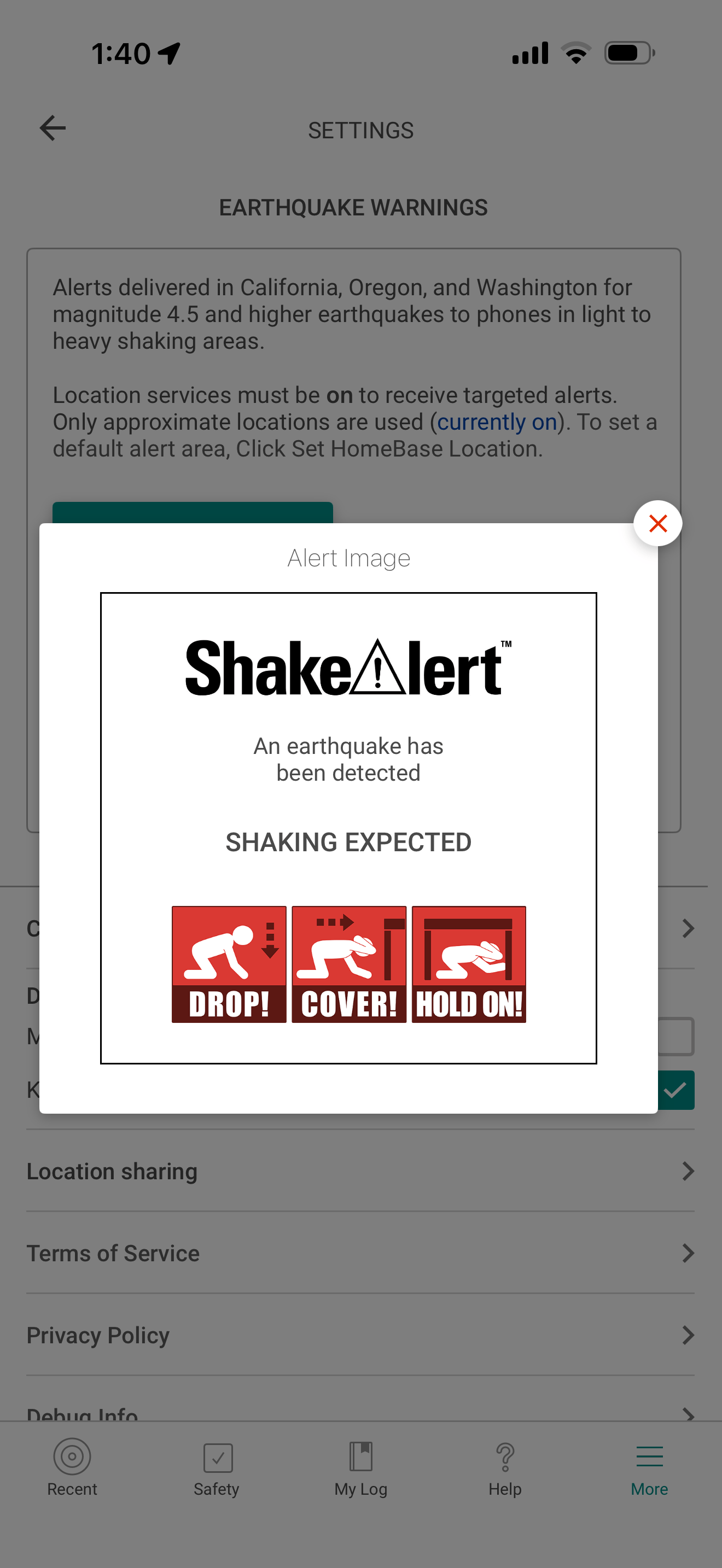
The Previous Earthquake Alert Provides the Bare Minimum
Users wouldn’t know when the earthquake would hit or how strong the shaking would be.
Design Process
Sketching & Ideation
The team created lo-fi sketches
We exploring ways to make a beautiful and powerful app and surface key features like alerts, and earthquake information.
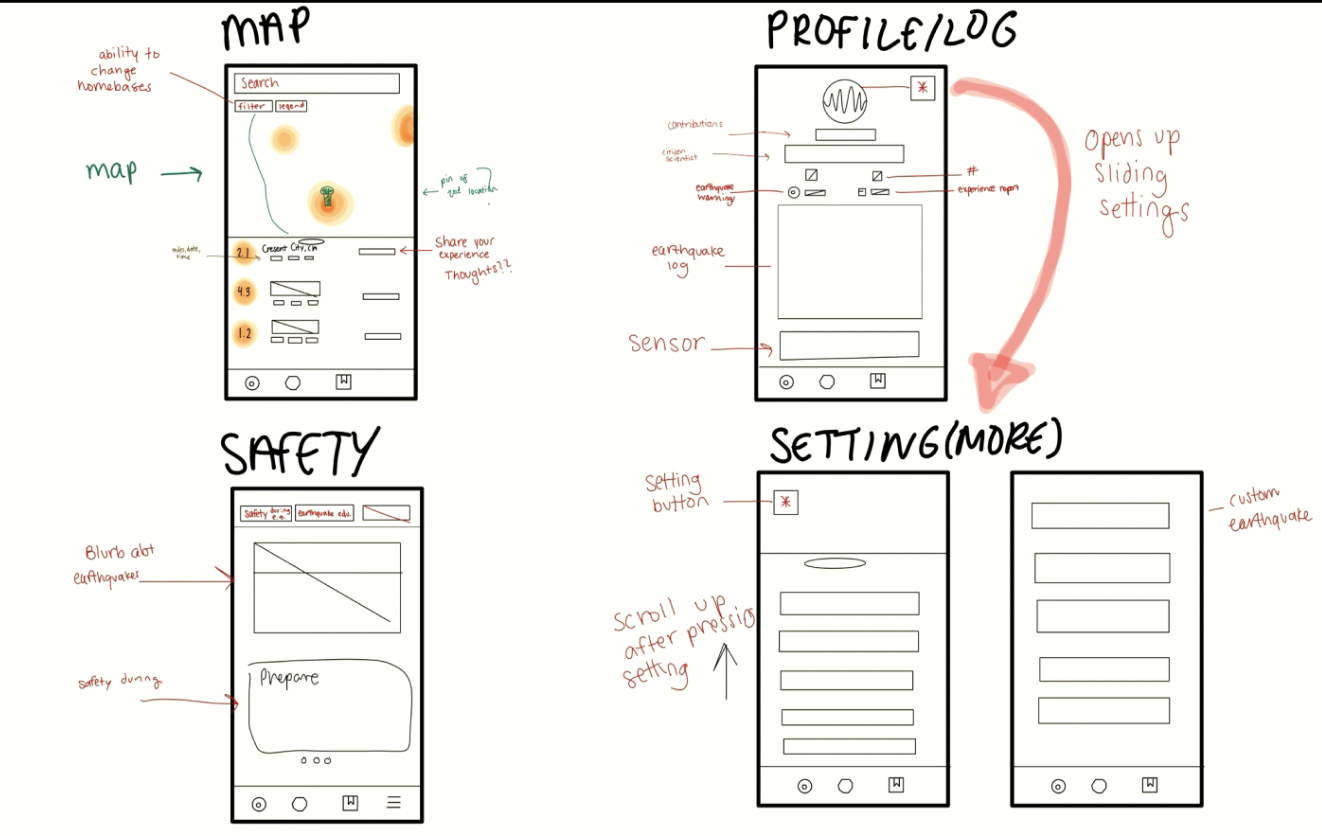
Team sketch Map/Profile Sketches
Design Process
My Shift In Thinking
I Realized every earthquake app including ours in early sketches defaults to a map-first landing page. That pattern assumes users want to explore.
But our research showed that users wanted reassurance, not exploration. They wanted to know they were safe and that the people they care about were safe. That reframe changed everything.
Design Process
The Turning Point : My Dashboard Concept
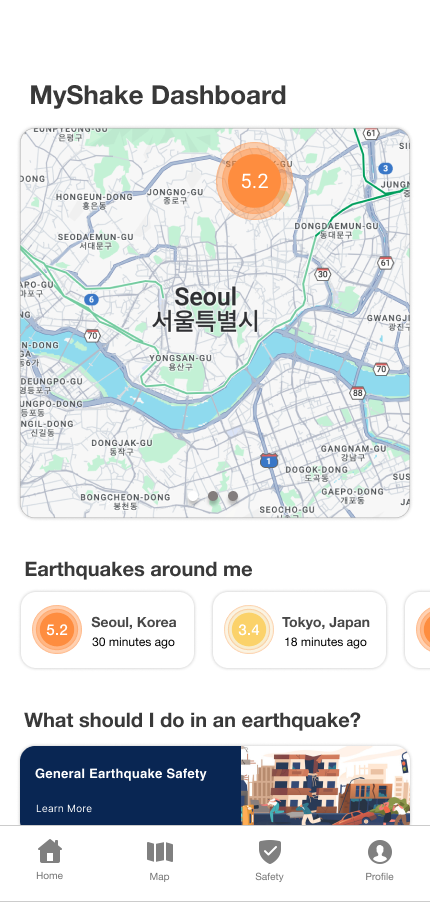
I Proposed Making MyShake Open to a Personalized Dashboard Instead of a Map
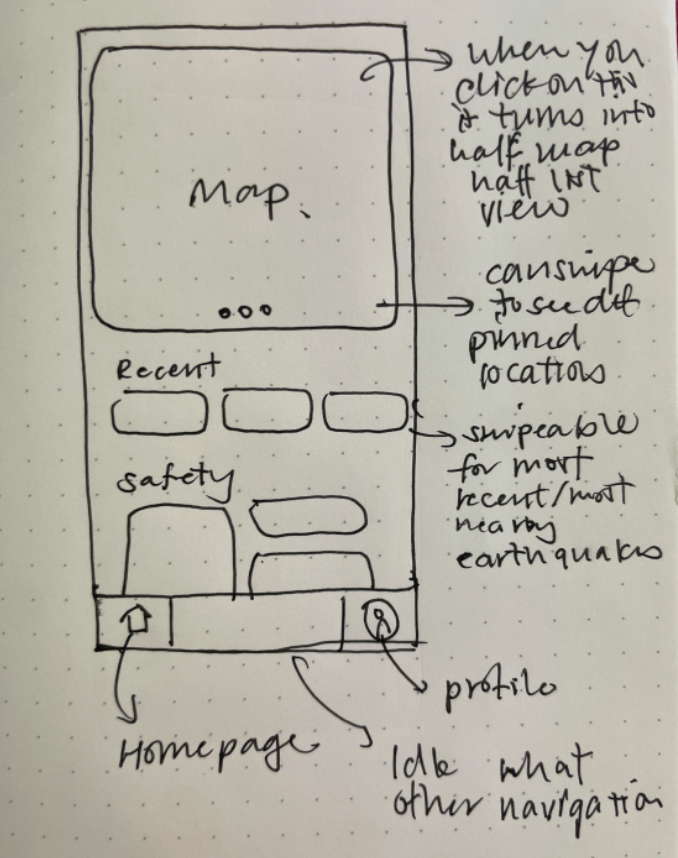
Early sketch exploring a widget-based homepage
Design Process
Initial Reation
The Dashboard Introduced Real Risk -
The Team was Impressed but Hesitant with My Design.
Their Concerns
- Larger design system required
- Tight project timeline
- Risk of Seismology Lab disapproval
Design Process
The Debate
The Dashboard Felt Outside the Original Scope
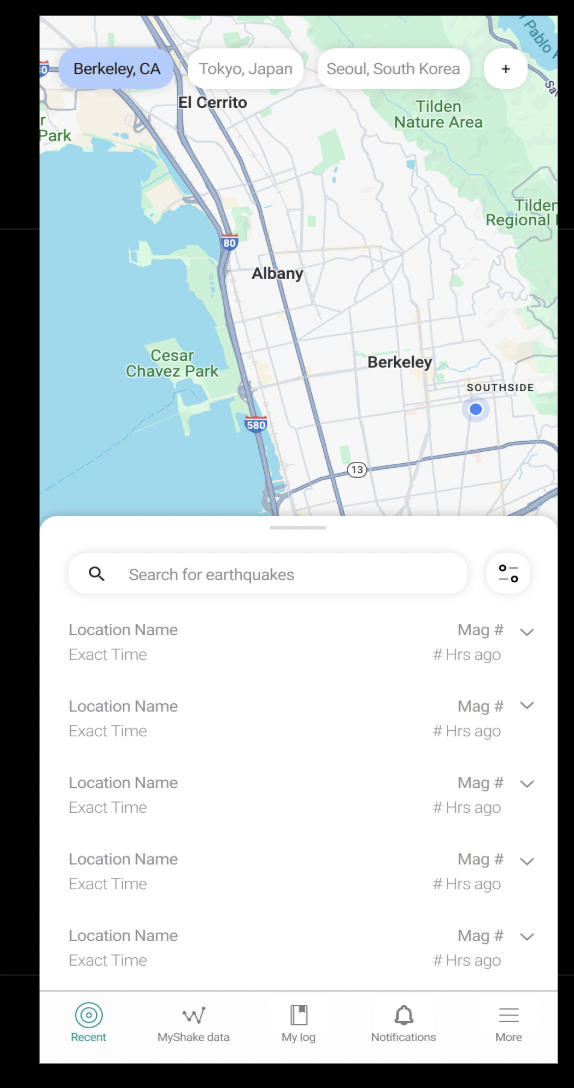
Because of these concerns, the team leaned toward refining the existing map-first interface instead of introducing a new dashboard. This approach felt safer because it would improve the UI without changing the app’s underlying structure.
Option A:
Teams Refined Landing Page
Safer approach. Familiar to users. Visual improvements without structural risk.
Option B:
Dashboard Landing Page
Innovative but risky. Personal, unprecedented for earthquake apps.
Design Process
My Argument
A dashboard would solve 2 pain points by allowing faster access as well as stand out from its competitors.
The team agreed to take the risk.
The dashboard would transform MyShake from a flat safety app into something that actually felt like it cared about its users.
Design Process
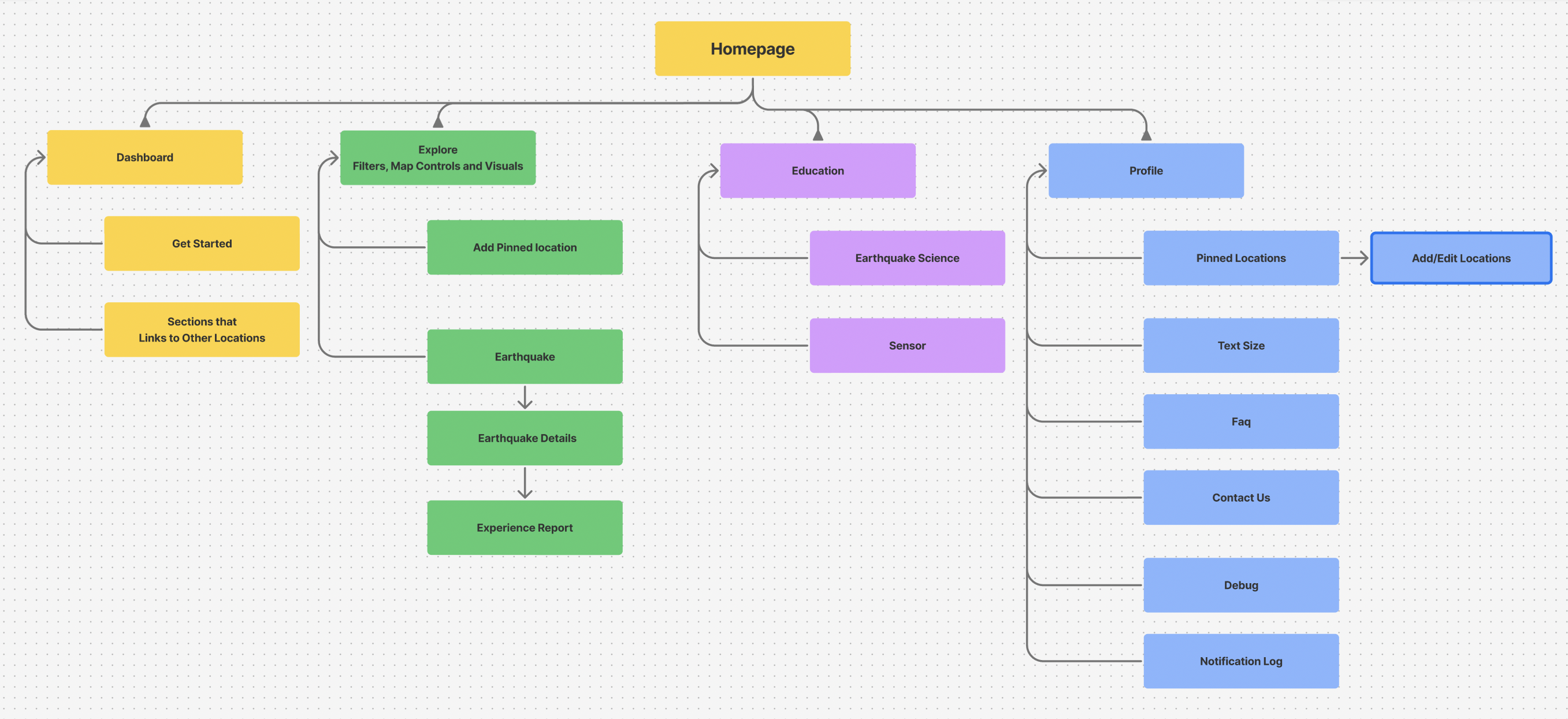
Information Architecture
The new IA simplified navigation — users could access any key feature within 1-2 taps instead of digging through menus.
Final Solution
The First Impression
I designed a short tutorial page to help them understand the most important aspects of the app Through Progressive Disclosure.
Early Warning Shortcuts
New users have 2 instant access points to enable an early warning.
Multiple Ways to Set Up Alerts
Early warning setup went from 5 steps to 2. Swipe right on the map or tap the banner.
Staying Connected to What Matters
Whether it's your own home or your mom's apartment across the state, the dashboard keeps you informed about the places that matter most.
Viewing Pinned Locations
Receiving and Reviewing a Notification
Receiving and Reviewing a Notification
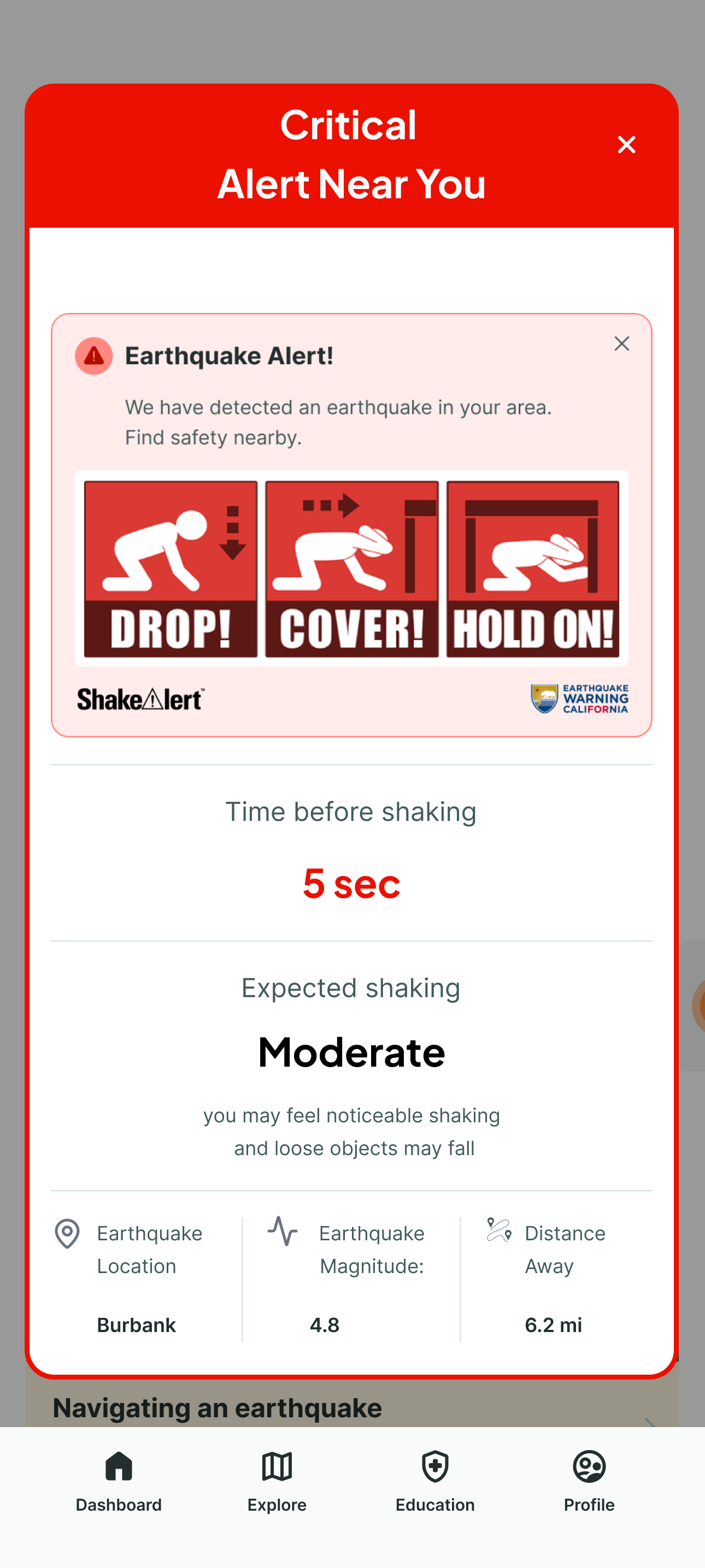
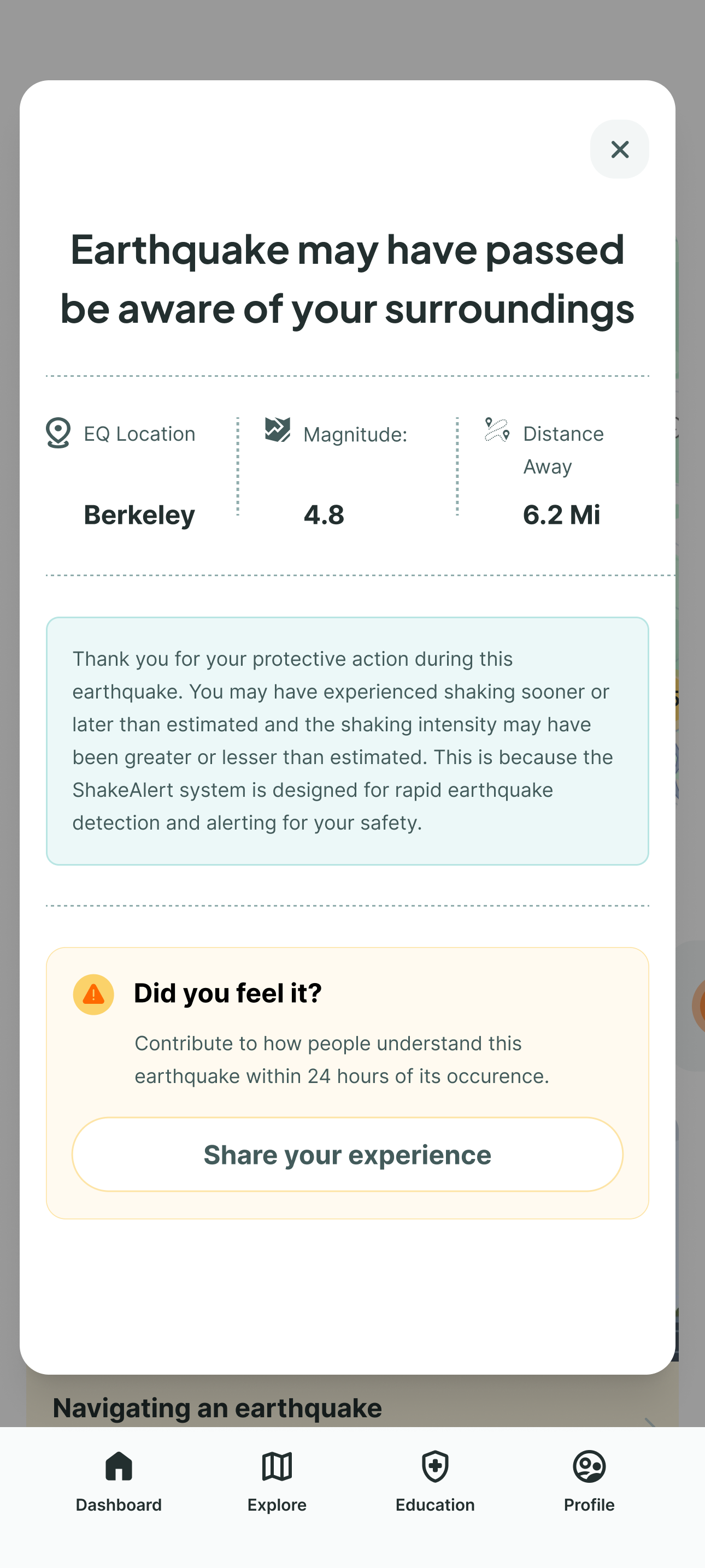
Reimagining the Critical Alert
The alert is MyShake's core moment. The original showed only basic detection information in an outdated UI. I redesigned both the pre-earthquake warning and post-earthquake follow-up — adding countdown timers, intensity levels, safety actions, and clear next steps.
Interface Improvements
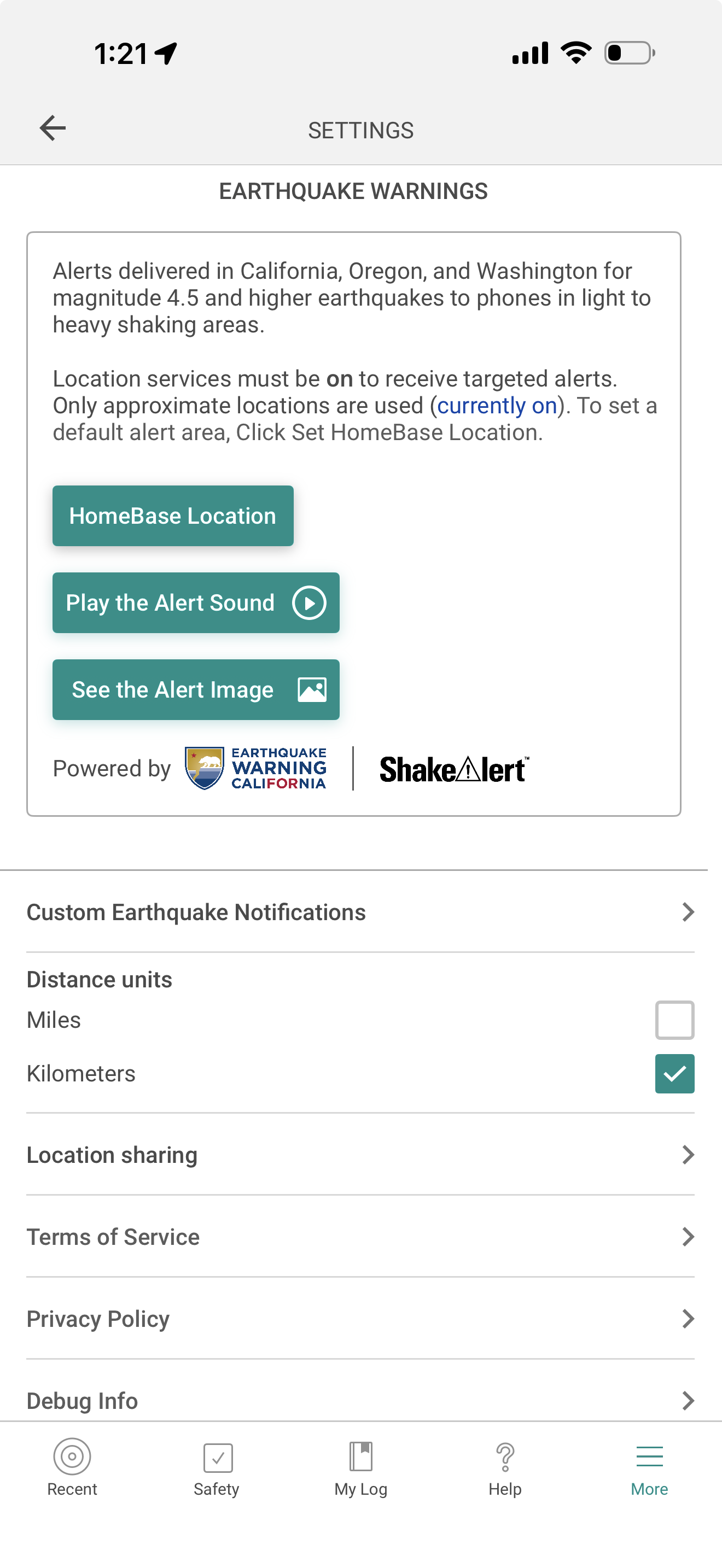
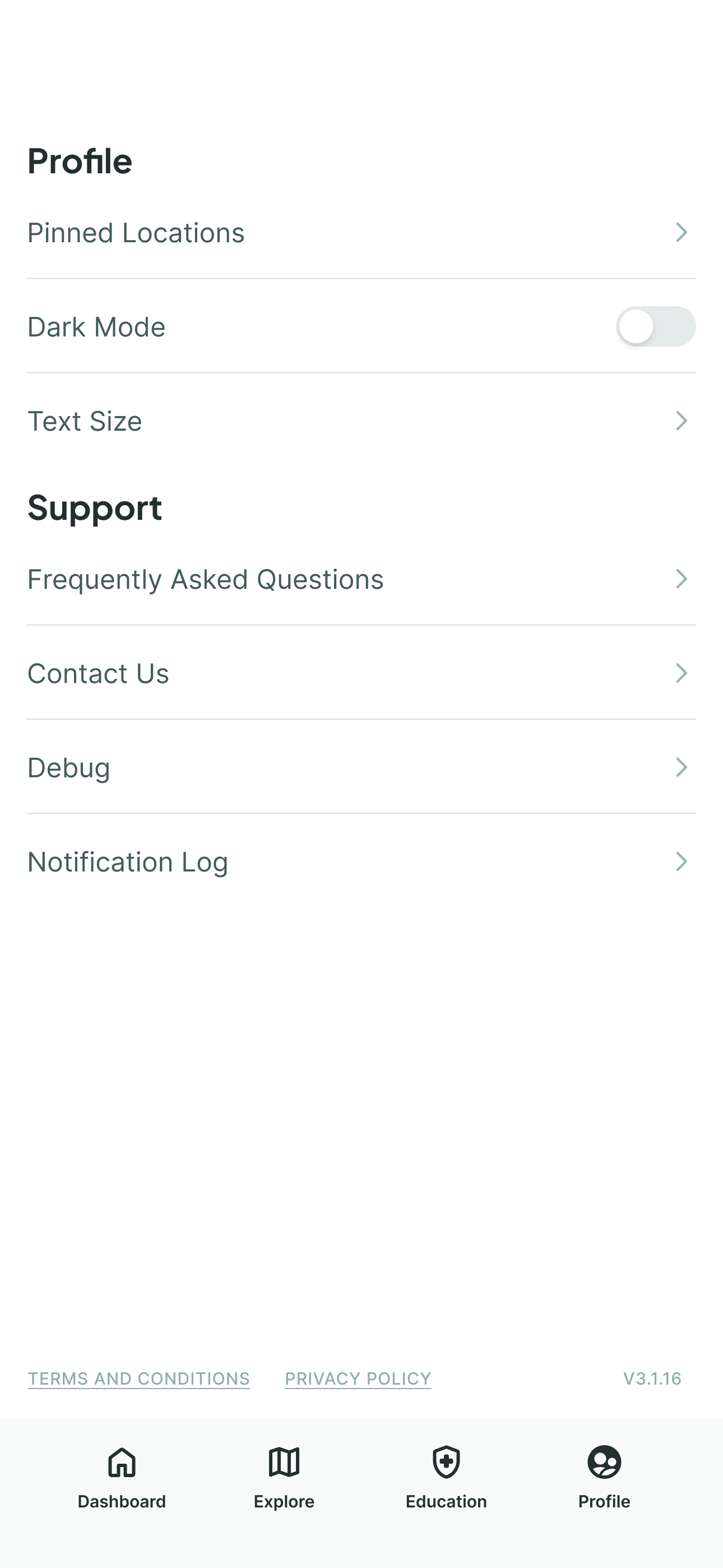
New Navigation Thats More Intuitive
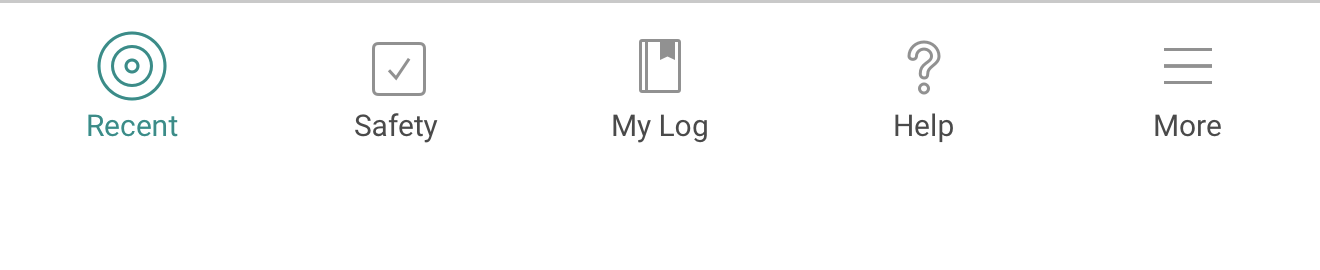

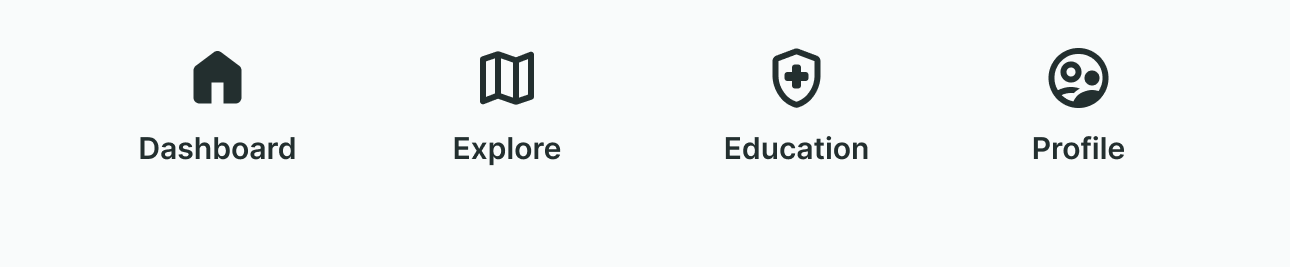
The team reframed settings as a profile page to introduce a sense of ownership and personalization.
Validation
4.0/5 Ease of Usability
3 of us conducted two rounds of usability testing across 16 participants — young adults and seniors at Rossmore retirement community.
Important Note
Testing was conducted without the tutorial and tasks were phrased in a way to challenge a users thinking.
R1 - Initial Redesign
12 Participants (6 Seniors, 6 Young Adults)
- Young adults averaged ~3.3/5 ease of use; seniors averaged ~4.0/5
- Users struggled to create pinned locations
- Buttons were hard to see in flows
- Icons (layers, filters) were not intuitive
R2 - Iterated Redesign
4 Participants (Young Adults)
- Added Pinned Locations visibility on the profile screen
- Improved Pinned Location user flow
- Pinned Location task success: 100% (up from frequent failures in R1)
- Ease of use improved to ~4.0/5 (matching senior ratings from R1)
One senior participant said:
"It is giving me immediate choices." — directly validating the dashboard approach.
Validation
Design Iteration:
Surfacing Pinned Locations
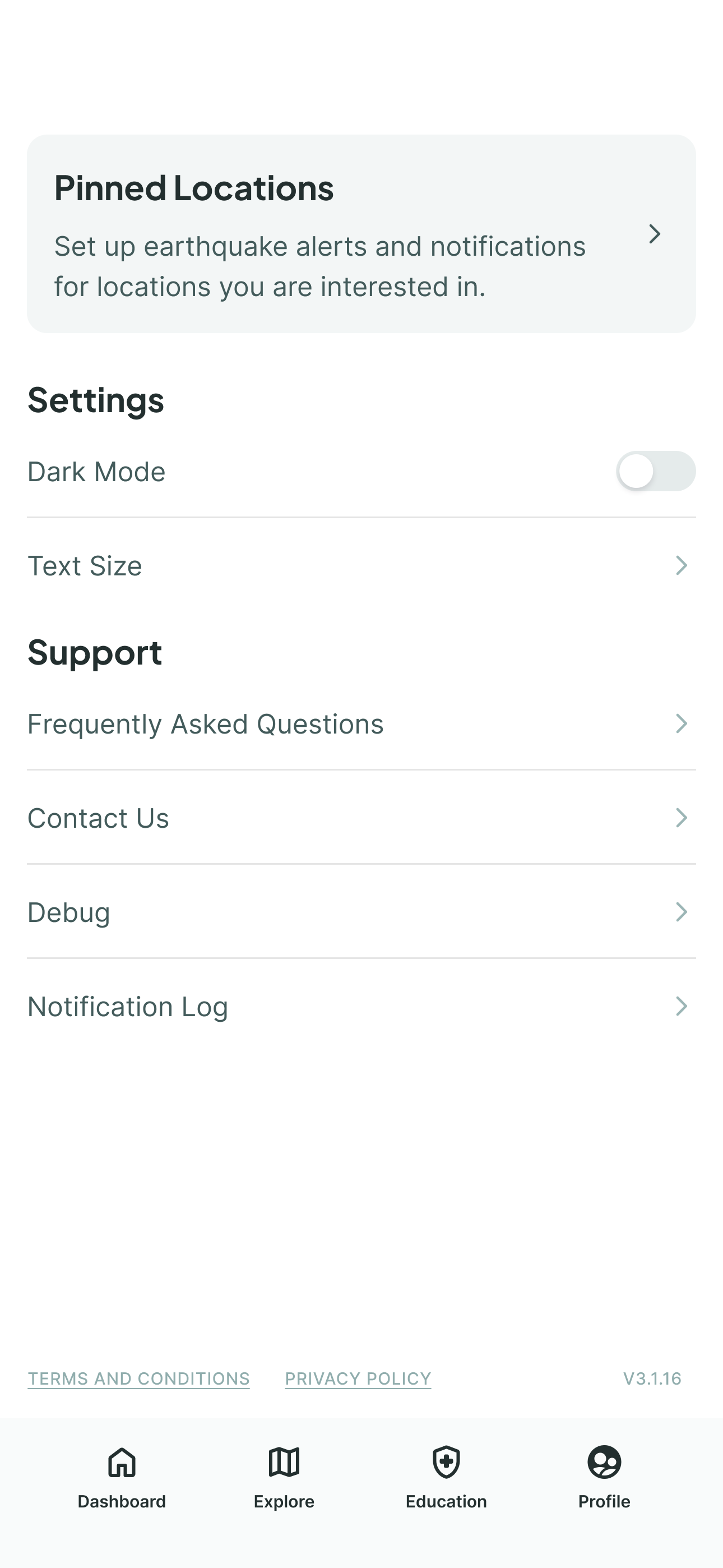
R1 testing revealed users couldn't find Pinned Locations even with dashboard shortcuts — Some would click on profile and it was buried as a regular menu item. I designed an elevated prominent banner card, making its purpose immediately clear.
What I Learned
Advocating for Bold Ideas
The hardest part wasn't designing the dashboard — it was convincing the team to take the risk. I made the case with research, and that shifted the conversation.
I'm currently the sole product designer on MyShake (Oct 2025 - Present), continuing this work by expanding responsive design and building new features that make earthquake preparedness more accessible.
Dashboard Implementation
From Buried Menus to One Glanceable Screen
Timeline
Jan 30 2024 - Dec 2024
My Role
Product Designer
Conceptualized and led dashboard redesign
Co-led Usability Testing
Team
5 Designers
1 Project Manager
Discipline
Interaction Design
Usability Testing
Information Architecture
Impact
4/5 Usability
Tested with 16 users; current app rated 2.8 on App Store
50%
Reduced clicks for key features (early warning setup from 5 steps to 2-3 via dashboard shortcuts)
41% Faster
Reduced key task time from 2:47 (R1 )→ 1:38 (R2) via dashboard and profile shortcuts
Shipping in 2026
Currently sole product designer working on responsiveness and designing active phone sensors
Summary
I redesigned MyShake’s landing page architecture with a dashboard that surfaces critical earthquake tools in one screen for its 4M+ users.
Introduction
Myshake is the Only Earthquake App That Delivers Early Warning Alerts
Built in partnership with USGS and UC Berkeley's Seismology Lab, MyShake delivers earthquake alerts seconds before shaking begins in California , Oregon and Washington. With 4.4 million users it provides alerts, post-quake reporting, and preparedness tools.
Problem
Despite Having Life-Saving Technology MyShake was Losing Users
There’s only 1 access point to setting up an early warning alert or custom earthquake notification and 5 steps for both — far too complex for a safety app.
Business
Goal
Make MyShake the #1 earthquake app by increasing engagement and building trust during emergencies.
Research
Surveyed 30 Users, Analyzed 2 Competitors
Key Insight
Users didn't just want faster access — they wanted to feel like the app was looking out for them.
Competitive Gap
I learned that other earthquake apps had more users with higher reviews even though MyShake is the only app that has early warning.
Key User Needs
Alerts Within Reach
Users expected to set up early warnings quickly
Stay Informed About Places That Matter
Monitor locations they care about and see earthquake activity at a glance.
Guidance When It Matters
Users needed clear, actionable information when earthquakes happen
Research
Understanding
the 3rd Insight
The Previous Earthquake Alert Provides the Bare Minimum
Users wouldn’t know when the earthquake would hit or how strong the shaking would be.
Design Process
Sketching & Ideation
The team created lo-fi sketches
We exploring ways to make a beautiful and powerful app and surface key features like alerts, and earthquake information.
Team sketch Map/Profile Sketches
Design Process
My Shift In Thinking
I Realized every earthquake app including ours in early sketches defaults to a map-first landing page. That pattern assumes users want to explore.
But our research showed that users wanted reassurance, not exploration. They wanted to know they were safe and that the people they care about were safe. That reframe changed everything.
Design Process
The Turning Point :
My Dashboard Concept
I Proposed Making MyShake Open to a Personalized Dashboard Instead of a Map
Early sketch exploring a widget-based homepage
Design Process
Initial Reation
The Dashboard Introduced Real Risk - The Team was Impressed but Hesitant with My Design.
Their Concerns
- Larger design system required
- Tight project timeline
- Risk of Seismology Lab disapproval
Design Process
The Debate
The Dashboard Felt Outside the Original Scope
Because of these concerns, the team leaned toward refining the existing map-first interface instead of introducing a new dashboard. This approach felt safer because it would improve the UI without changing the app’s underlying structure.
Option A:
Teams Refined Landing Page
Safer approach. Familiar to users. Visual improvements without structural risk.
Option B:
Dashboard Landing Page
Innovative but risky. Personal, unprecedented for earthquake apps.
Design Process
My Argument
A dashboard would solve 2 pain points by allowing faster access as well as stand out from its competitors.
The team agreed to take the risk.
The dashboard would transform MyShake from a flat safety app into something that actually felt like it cared about its users.
Design Process
Information Architecture
The new IA simplified navigation — users could access any key feature within 1-2 taps instead of digging through menus.
Final Solution
The First Impression
I designed a short tutorial page to help them understand the most important aspects of the app Through Progressive Disclosure.
Early Warning Shortcuts
New users have 2 instant access points to enable an early warning.
Multiple Ways to Set Up Alerts
Early warning setup went from 5 steps to 2. Swipe right on the map or tap the banner.
Staying Connected to What Matters
Whether it's your own home or your mom's apartment across the state, the dashboard keeps you informed about the places that matter most.
Viewing Pinned Locations
Receiving and Reviewing a Notification
Receiving and Reviewing a Notification
Reimagining the Critical Alert
The alert is MyShake's core moment. The original showed only basic detection information in an outdated UI. I redesigned both the pre-earthquake warning and post-earthquake follow-up — adding countdown timers, intensity levels, safety actions, and clear next steps.
Interface Improvements
New Navigation Thats More Intuitive

The team reframed settings as a profile page to introduce a sense of ownership and personalization.
Validation
4.0/5 Ease of Usability
3 of us conducted two rounds of usability testing across 16 participants — young adults and seniors at Rossmore retirement community.
Important Note
Testing was conducted without the tutorial and tasks were phrased in a way to challenge a users thinking.
R1 - Initial Redesign
12 Participants (6 Seniors, 6 Young Adults)
- Young adults averaged ~3.3/5 ease of use; seniors averaged ~4.0/5
- Users struggled to create pinned locations
- Buttons were hard to see in flows
- Icons (layers, filters) were not intuitive
R2 - Iterated Redesign
4 Participants (Young Adults)
- Added Pinned Locations visibility on the profile screen
- Improved Pinned Location user flow
- Pinned Location task success: 100% (up from frequent failures in R1)
- Ease of use improved to ~4.0/5 (matching senior ratings from R1)
One senior participant said:
"It is giving me immediate choices." — directly validating the dashboard approach.
Validation
Design Iteration:
Surfacing Pinned Locations
R1 testing revealed users couldn't find Pinned Locations even with dashboard shortcuts — Some would click on profile and it was buried as a regular menu item. I designed an elevated prominent banner card, making its purpose immediately clear.
What I Learned
Advocating for Bold Ideas
The hardest part wasn't designing the dashboard — it was convincing the team to take the risk. I made the case with research, and that shifted the conversation.
I'm currently the sole product designer on MyShake (Oct 2025 - Present), continuing this work by expanding responsive design and building new features that make earthquake preparedness more accessible.
Dashboard Implementation
From Buried Menus to One Glanceable Screen
Timeline
Jan 30 2024 - Dec 2024
My Role
Product Designer
Conceptualized and led dashboard redesign
Co-led Usability Testing
Team
5 Designers
1 Project Manager
Discipline
Interaction Design
Usability Testing
Information Architecture
Impact
4/5 Usability
Tested with 16 users; current app rated 2.8 on App Store
50%
Reduced clicks for key features (early warning setup from 5 steps to 2-3 via dashboard shortcuts)
41% Faster
Reduced key task time from 2:47 (R1 )→ 1:38 (R2) via dashboard and profile shortcuts
Shipping in 2026
Currently sole product designer working on responsiveness and designing active phone sensors
Summary
I redesigned MyShake’s landing page architecture with a dashboard that surfaces critical earthquake tools in one screen for its 4M+ users.
Introduction
Myshake is the Only Earthquake App That Delivers Early Warning Alerts
Built in partnership with USGS and UC Berkeley's Seismology Lab, MyShake delivers earthquake alerts seconds before shaking begins in California , Oregon and Washington. With 4.4 million users it provides alerts, post-quake reporting, and preparedness tools.
Problem
Despite Having Life-Saving Technology MyShake was Losing Users
There’s only 1 access point to setting up an early warning alert or custom earthquake notification and 5 steps for both — far too complex for a safety app.
Business Goal
Make MyShake the #1 earthquake app by increasing engagement and building trust during emergencies.
Research
Surveyed 30 Users, Analyzed 2 Competitors
Key Insight
Users didn't just want faster access — they wanted to feel like the app was looking out for them.
Competitive Gap
I learned that other earthquake apps had more users with higher reviews even though MyShake is the only app that has early warning.
Key User Needs
Alerts Within Reach
Users expected to set up early warnings quickly
Stay Informed About Places That Matter
Monitor locations they care about and see earthquake activity at a glance.
Guidance When It Matters
Users needed clear, actionable information when earthquakes happen
Research
Understanding the 3rd Insight
The Previous Earthquake Alert Provides the Bare Minimum
Users wouldn’t know when the earthquake would hit or how strong the shaking would be.
Design Process
Sketching & Ideation
The team created lo-fi sketches
We explored ways to make a beautiful and powerful app and surface key features like alerts, and earthquake information.
Team sketch Map/Profile Sketches
Design Process
My Shift In Thinking
I Realized every earthquake app including ours in early sketches defaults to a map-first landing page. That pattern assumes users want to explore.
But our research showed that users wanted reassurance, not exploration. They wanted to know they were safe and that the people they care about were safe. That reframe changed everything.
Design Process
The Turning Point :
My Dashboard Concept
I Proposed Making MyShake Open to a Personalized Dashboard Instead of a Map
Early sketch exploring a widget-based homepage
Design Process
Initial Reaction
The Dashboard Introduced Real Risk -
The Team was Impressed but Hesitant with My Design.
Their Concerns
- Larger design system required
- Tight project timeline
- Risk of Seismology Lab disapproval
Design Process
The Debate
The Dashboard Felt Outside the Original Scope
Because of these concerns, the team leaned toward refining the existing map-first interface instead of introducing a new dashboard. This approach felt safer because it would improve the UI without changing the app’s underlying structure.
Option A:
Teams Refined Landing Page
Safer approach. Familiar to users. Visual improvements without structural risk.
Option B:
Dashboard Landing Page
Innovative but risky. Personal, unprecedented for earthquake apps.
Design Process
My Argument
A dashboard would solve 2 pain points by allowing faster access as well as stand out from its competitors.
The team agreed to take the risk.
The dashboard would transform MyShake from a flat safety app into something that actually felt like it cared about its users.
Design Process
Information Architecture
The new IA simplified navigation — users could access any key feature within 1-2 taps instead of digging through menus.
Final Solution
The First Impression
I designed a short tutorial page to help them understand the most important aspects of the app Through Progressive Disclosure.
Early Warning Shortcuts
New users have 2 instant access points to enable an early warning.
Multiple Ways to Set Up Alerts
Early warning setup went from 5 steps to 2. Swipe right on the map or tap the banner.
Staying Connected to What Matters
Whether it's your own home or your mom's apartment across the state, the dashboard keeps you informed about the places that matter most.
Viewing Pinned Locations
Receiving and Reviewing a Notification
Design Decision
I explored a contact-syncing system for safety confirmations, but the Seismology Lab ruled it out of scope. Users don't need MyShake to message family — they just need to know if an earthquake happened near someone they care about.
Reimagining the Critical Alert
The alert is MyShake's core moment. The original showed only basic detection information in an outdated UI. I redesigned both the pre-earthquake warning and post-earthquake follow-up — adding countdown timers, intensity levels, safety actions, and clear next steps.
Interface Improvements
New Navigation Thats More Intuitive

The team reframed settings as a profile page to introduce a sense of ownership and personalization.
Validation
4.0/5 Ease of Usability
3 of us conducted two rounds of usability testing across 16 participants — young adults and seniors at Rossmore retirement community.
Important Note
Testing was conducted without the tutorial and tasks were phrased in a way to challenge a users thinking.
R1 - Initial Redesign
12 Participants (6 Seniors, 6 Young Adults)
- Young adults averaged ~3.3/5 ease of use; seniors averaged ~4.0/5
- Users struggled to create pinned locations
R2 - Iterated Redesign
4 Participants (Young Adults)
- Added Pinned Locations visibility on the profile screen
- Improved Pinned Location user flow
- Pinned Location task success: 100% (up from frequent failures in R1)
- Ease of use improved to ~4.0/5 (matching senior ratings from R1)
One senior participant said:
"It is giving me immediate choices." — directly validating the dashboard approach.
Validation
Design Iteration:
Surfacing Pinned Locations
I designed an elevated prominent banner card, making its purpose immediately clear.
R1 testing revealed users couldn't find Pinned Locations even with dashboard shortcuts — Some would click on profile and it was buried as a regular menu item.
What I Learned
Advocating for Bold Ideas
The hardest part wasn't designing the dashboard — it was convincing the team to take the risk. I made the case with research, and that shifted the conversation.
I'm currently the sole product designer on MyShake (Oct 2025 - Present), continuing this work by expanding responsive design and building new features that make earthquake preparedness more accessible.